TLDR; The idea of this post is to explore, in a broad way, a concept we do not discuss enough in the context of distributed systems development, but that makes a major difference for applications that need a high level of resilience. We will look at the design, deployment, observability, and failure response of an application that has the characteristic of being Availability Zone Independent (AZI).
Read the Portuguese version here: Entendendo o que é Availability Zone Independence(AZI) para aumentar a resiliência das aplicações.
In the previous post How static stability increases your application’s resilience we discussed how an application can keep operating without changing its state, even when dependencies fail totally or partially. Many examples I gave were related to the failure of an availability zone.
I used the term Availability Zone Independence (AZI) in the title of this post, but you may also find articles about the same subject using the term Availability Zone Affinity. I will use the first one because I think it better reflects the result I expect when I apply this concept to application design: making the application more resilient when failures happen, or, more specifically, making it fail independently when we are talking about availability zones.
Before we go deeper, let’s define a few concepts. What I describe in this article is valid for any cloud provider, or even any software that exposes the availability zone context to its customers, but I will focus on using the AWS cloud.
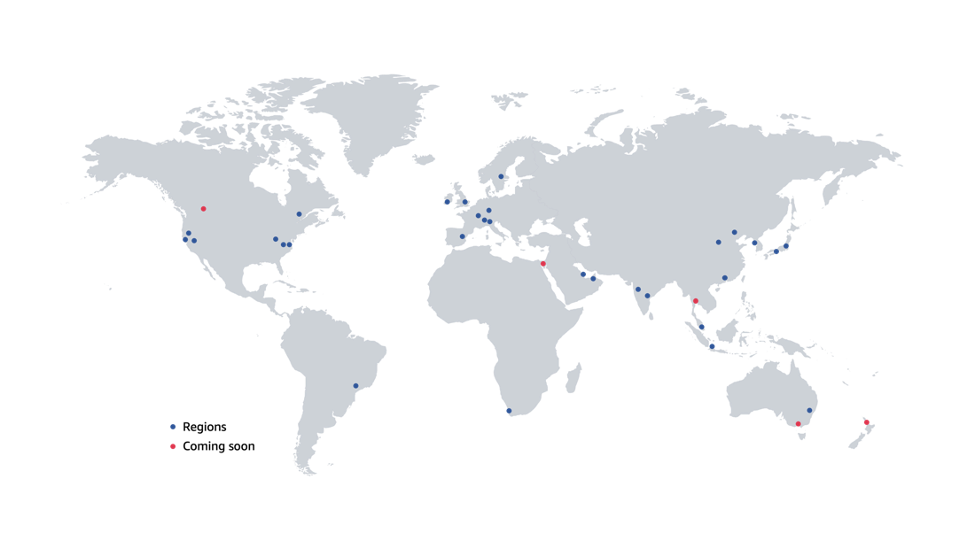
What is an AWS Region?
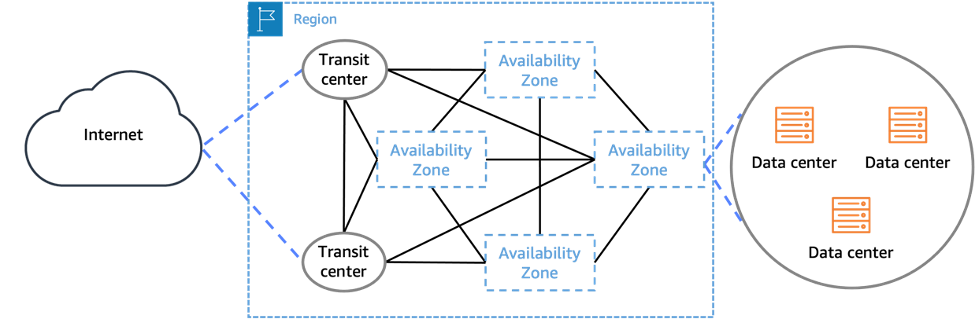
Taking the direct reference from the AWS website, a Region is a physical location somewhere in the world where data centers are grouped. Each group of logical data centers is called an Availability Zone (AZ). Each AWS Region consists of at least three isolated and physically separate AZs within a geographic area. Unlike other cloud providers, which usually define a Region as a single data center, the multi-AZ design of each AWS Region offers advantages to customers. Each AZ has independent power, cooling, and physical security and is connected through redundant, ultra-low-latency networks. AWS customers focused on high availability can design applications to run across multiple AZs to achieve even greater fault tolerance. AWS infrastructure Regions meet the highest levels of security, compliance, and data protection.
What is an Availability Zone (AZ)?
Taking the direct reference from the AWS website, an Availability Zone (AZ) is one or more discrete data centers with redundant power, networking, and connectivity in an AWS Region. AZs give customers the ability to operate production applications and databases with high availability, fault tolerance, and scalability at levels higher than a single data center can provide. All AZs in an AWS Region are interconnected with high-bandwidth, low-latency networking, over fully redundant dedicated metro fiber, providing high-throughput, low-latency networking between AZs. All traffic between AZs is encrypted. Network performance is sufficient to accomplish synchronous replication between AZs. AZs partition applications to make high availability easier. If an application is partitioned across multiple AZs, companies are better isolated and protected from problems such as power outages, lightning strikes, tornadoes, earthquakes, and other issues. AZs are physically separated by a meaningful distance, several kilometers, from other AZs, although all are within 100 km of each other.
What is Availability Zone Independence (AZI)?
AWS has regional and zonal services. It also has global services, but they are not the focus of this post. Regional services are services that AWS built on top of multiple Availability Zones so customers do not need to figure out how to make the best use of zonal services themselves. A zonal service is one that gives you the ability to specify in which Availability Zone resources are deployed. These services operate independently in each Availability Zone inside a Region and, more importantly, fail independently in each Availability Zone as well.
Availability Zone Independence (AZI) literally means independence from an availability zone, but throughout the rest of this post I will simply use AZI. It means designing applications so they can keep operating effectively even if one or more AZs are unavailable, and especially so that errors that happen in one AZ remain contained in the failing AZ and do not impact the other AZs. This concept applies only to zonal services.
The first step to implement AZI in your applications is to reduce cross-AZ traffic as much as possible. This has an impact on application resilience and cost, since cross-AZ traffic is charged, so reducing it means spending less. To understand this better, let’s look at a conventional architecture, but in a way we usually do not think about.
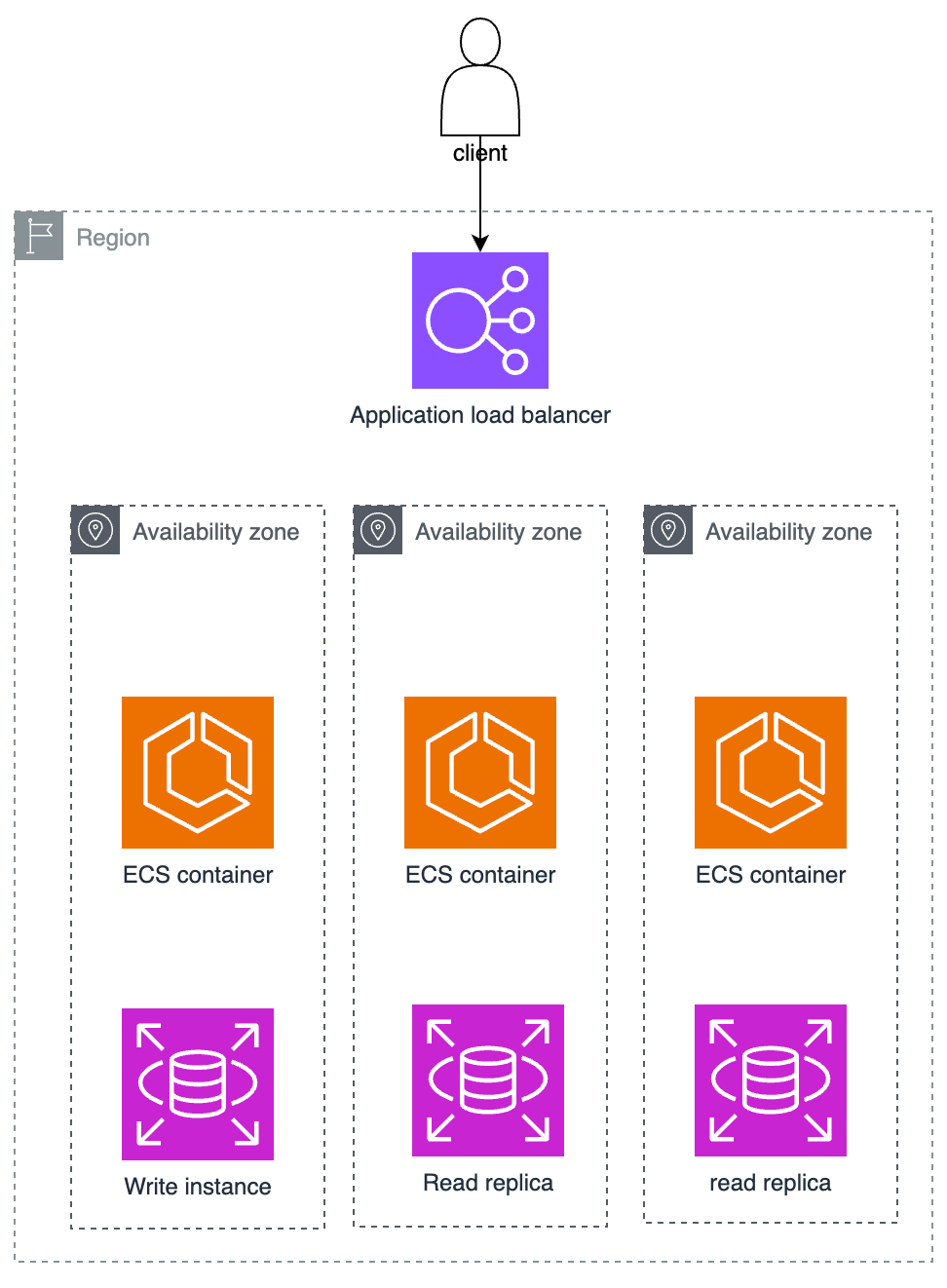
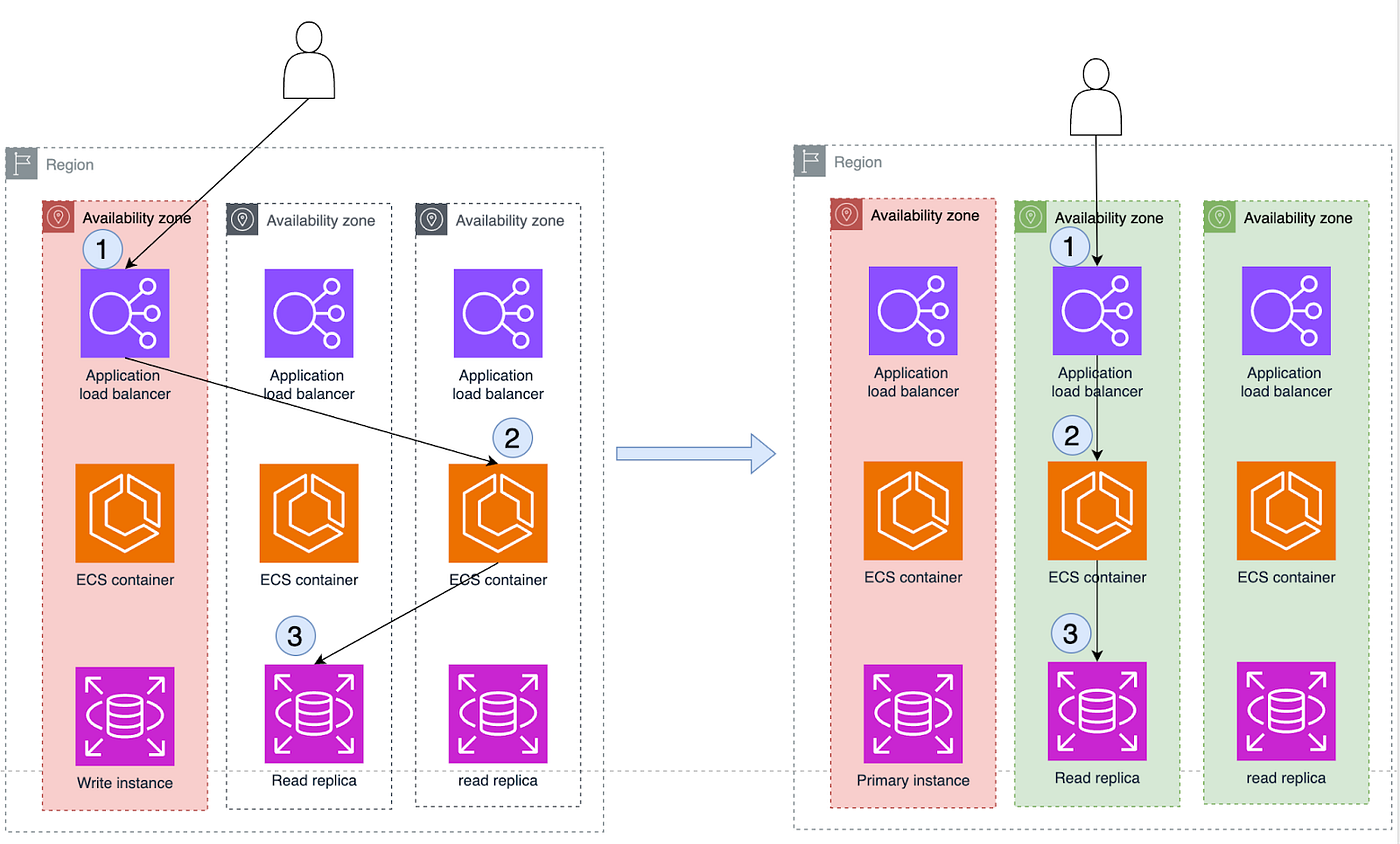
The image above shows a traditional multi-AZ application that receives traffic through a load balancer, redirects traffic to an ECS cluster, and then accesses an RDS database. But this diagram does not accurately reflect how things work in reality, or at least the default behavior of an AWS Application Load Balancer (ALB), or even of your application when it is not aware of what we are discussing in this post.
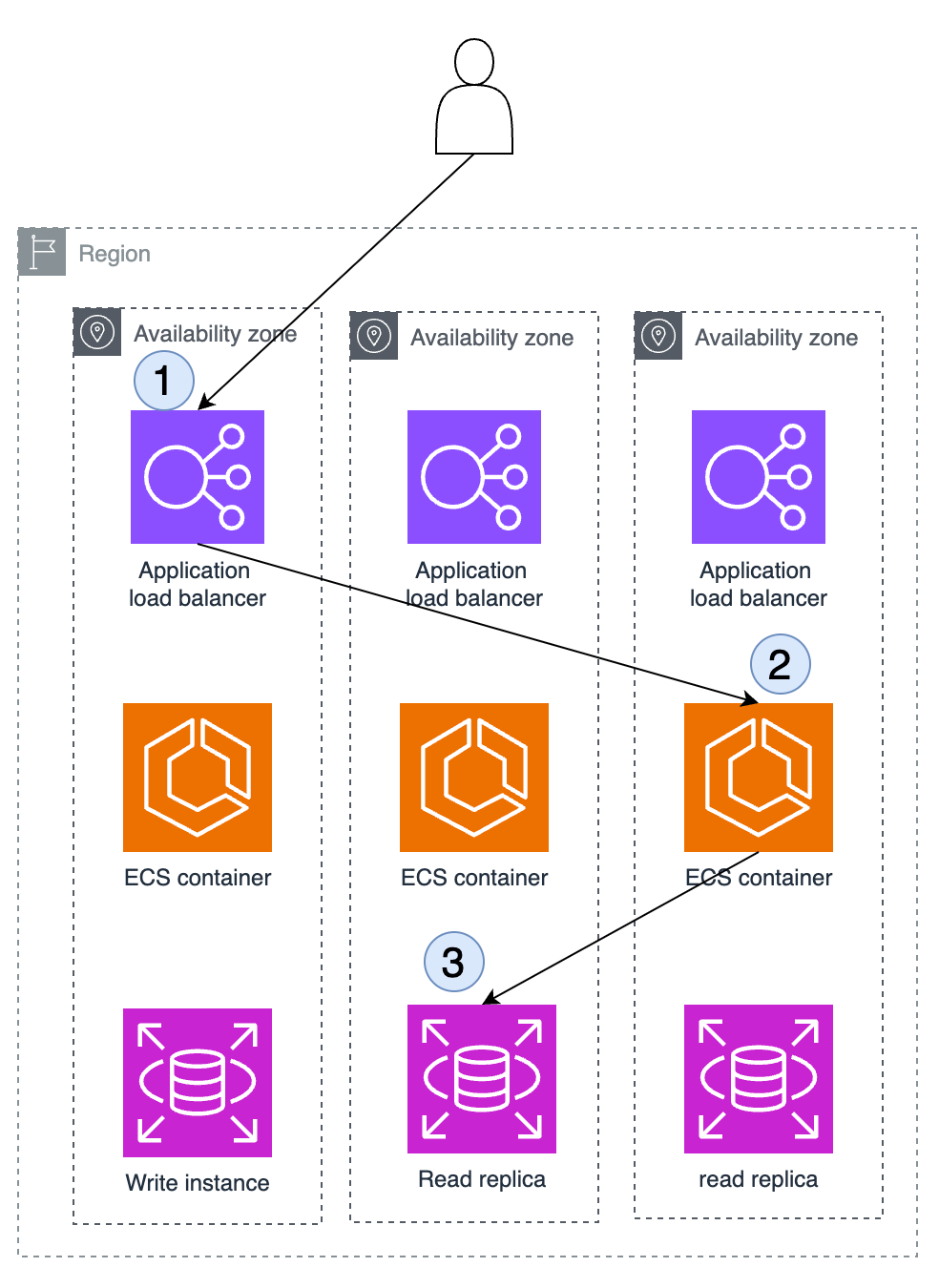
The image above now shows a more realistic scenario of what is actually running. Although AWS ALB is a regional service, a Region is only a logical grouping of AZs. Every service always runs in some AZ, with an IP address from a VPC in an AZ. To make this clearer, I created a test AWS ALB enabled in 3 AZs and then queried its DNS:
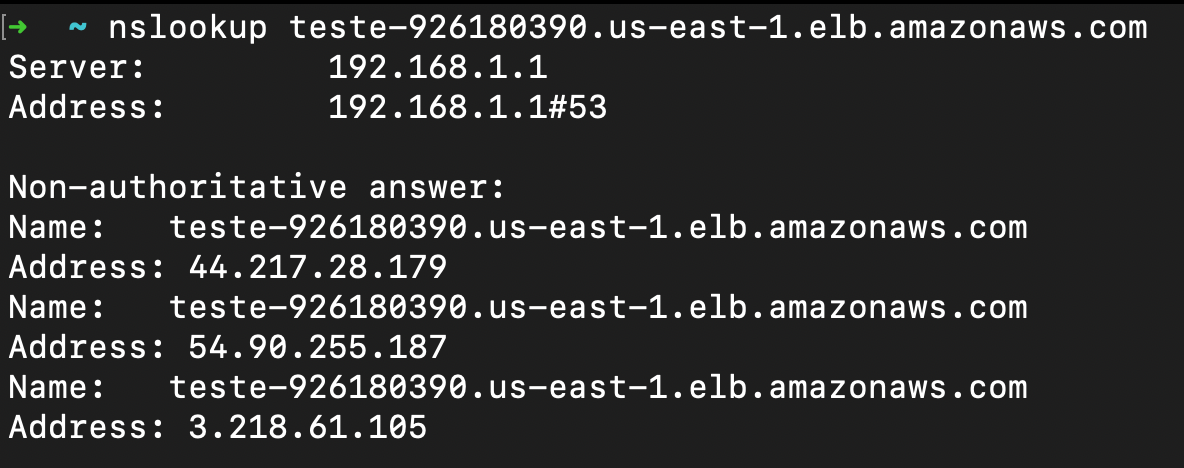
Then I disabled one AZ, leaving only 2 AZs enabled, and ran the same query again:
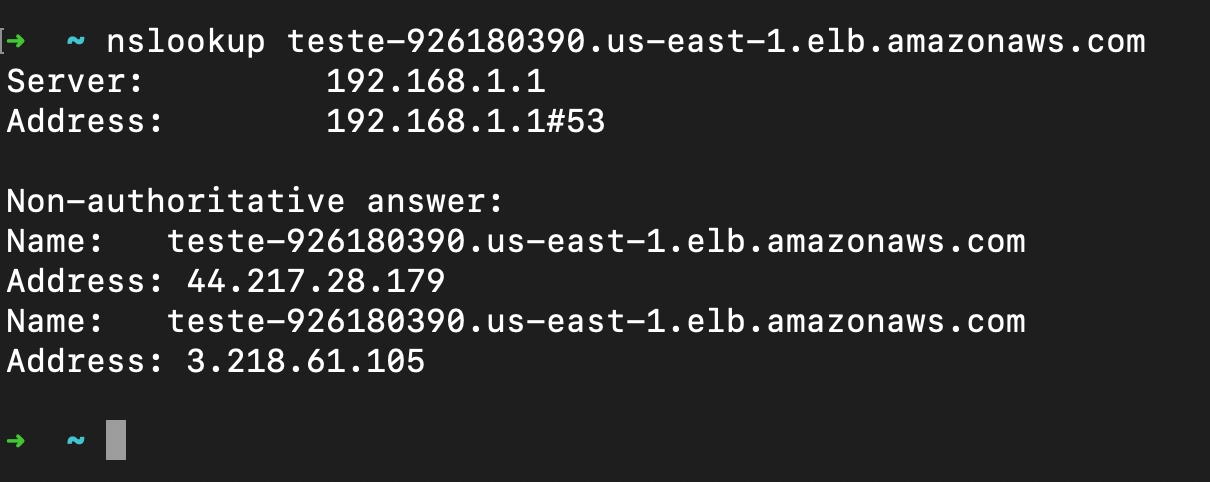
Notice that now only 2 IP addresses were returned instead of 3. That happens because when you create an ALB, the control plane places one ALB node in each enabled AZ. Route 53 distributes traffic in a balanced way and the ALB nodes do the same across all instances registered as targets, as shown in the image below.
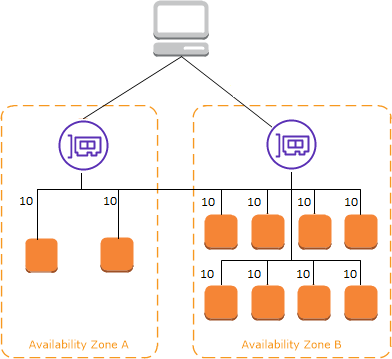
You can read more about this in this link. So the ALB receives a request in a specific zone and, because its function is to distribute requests and balance traffic equally, in an ideal scenario, across AZs, let’s assume each AZ would always receive 1/3 of the traffic and each target instance would also receive traffic proportionally. The scenario in the image above happens by default: your request may enter through AZ1, the ALB may send traffic to AZ3 because of its algorithm, and your application may access the database through the instance in AZ2. This is a very common behavior and, in my experience, it is rarely discussed or challenged.
Considering the design of the cloud, AWS in this post, and focusing on increasing resilience, one approach is to make sure failures that happen in one AZ do not impact the components of your application running in another AZ, and that your application as a whole is not affected simply because one AZ became unavailable. After all, this is why we design applications to use multiple AZs.
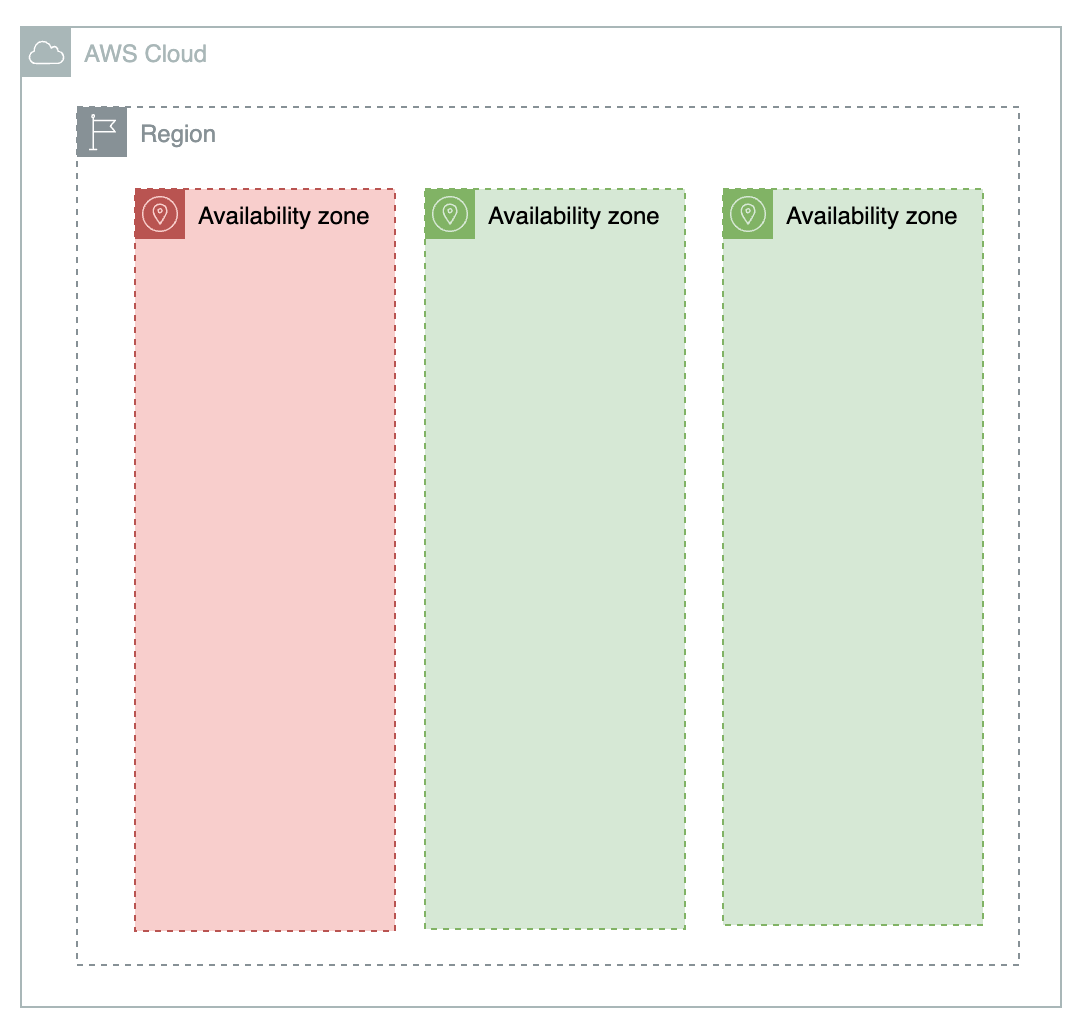
The image above shows our desired scenario, and that is why reducing cross-AZ traffic helps. But it is not enough. You need to think about application design for AZI, deployment, observability, and how you respond to failures that happen in a specific AZ so your application can truly keep operating, which means evacuating traffic from the unavailable AZ. That is what we will see from now on.
Designing the application to be AZI
The concept of AZI applies only to services that can be configured with zonal scope. Designing your application to be AZI means designing it so that the impact in one availability zone affects only the components in that zone and not the others, as already mentioned. The approach to achieve this depends on each service your application is composed of.
In this post I will use as an example the architecture we have been discussing, composed of ALB, ECS containers, and an RDS database. In the best scenario, we will have the behavior shown in the image below:
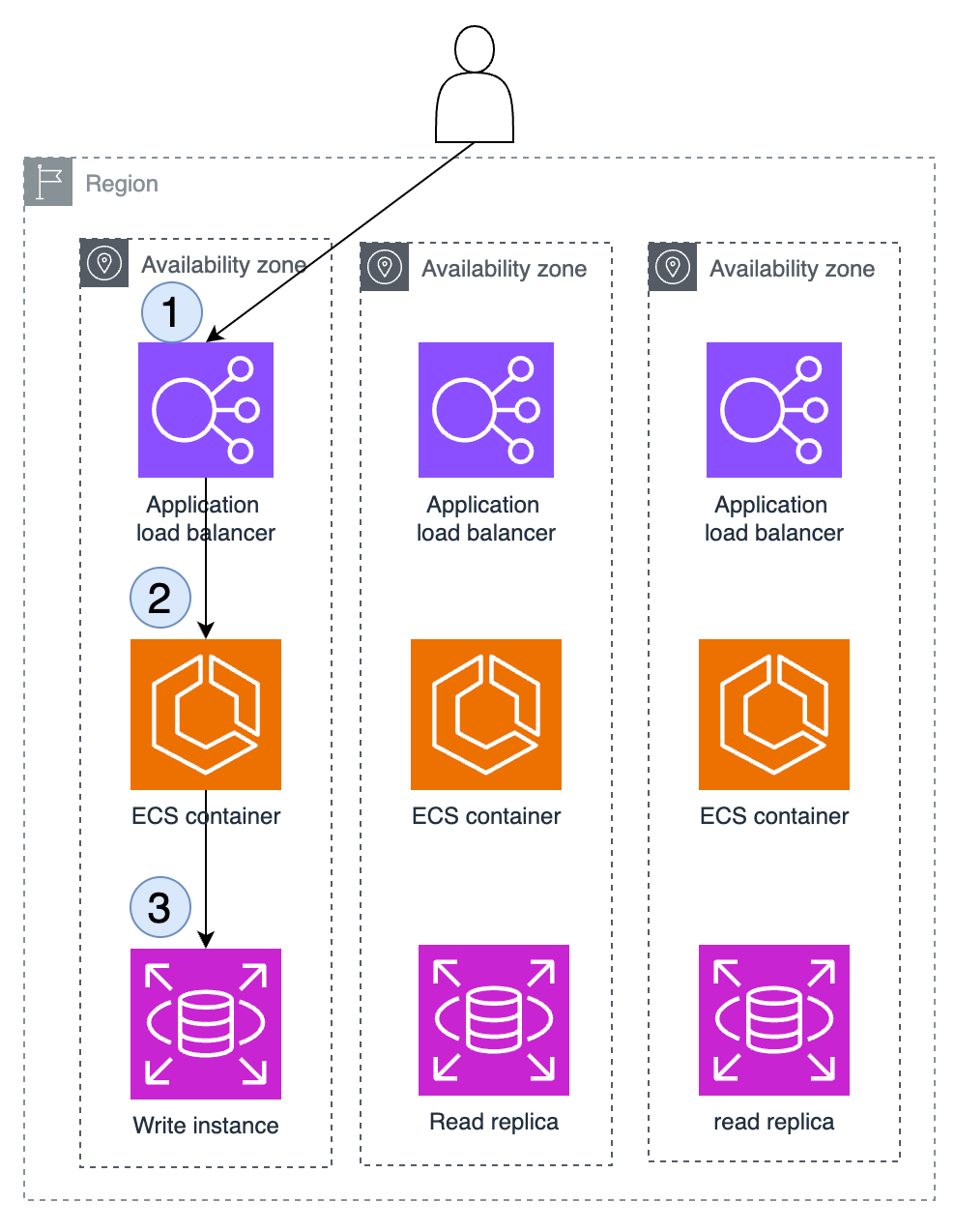
Now, if an AZ fails or components of your application fail in only one AZ, you can stop sending traffic to that AZ and continue operating normally with the others. We will still see how this “stop sending traffic to an unavailable AZ” can be done.
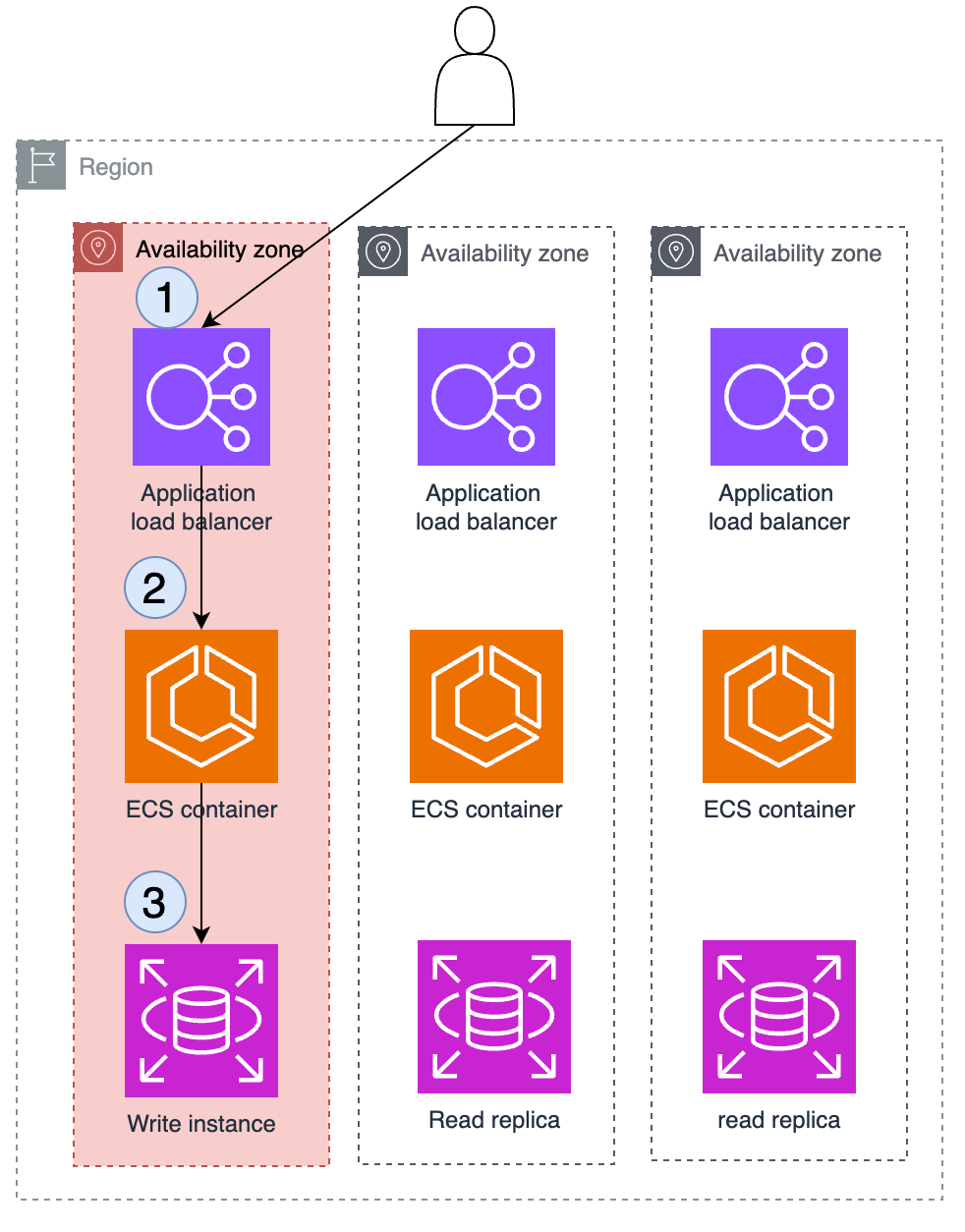
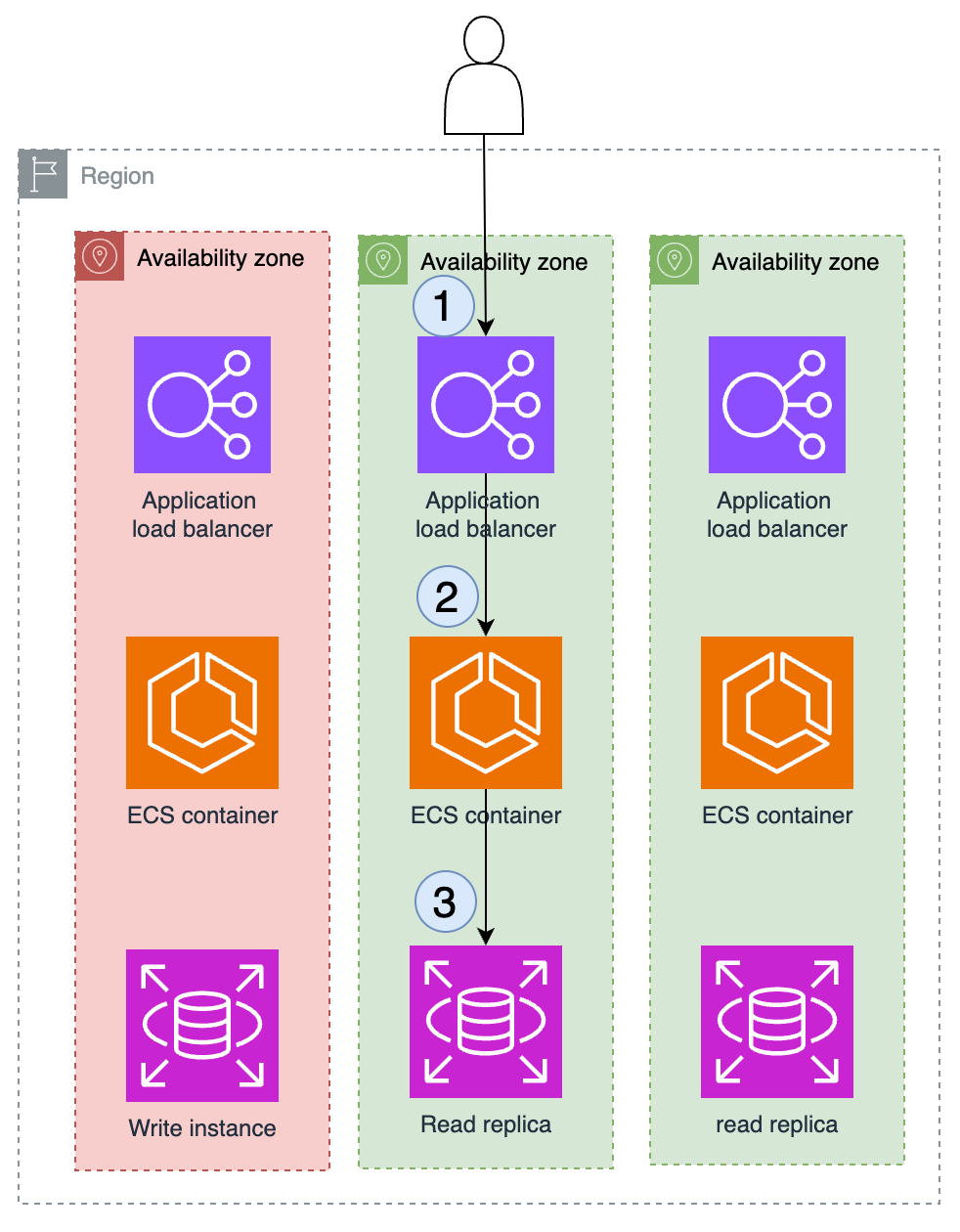
In the image below, the traffic from the failing AZ has already been evacuated, and only the other AZs that are operating normally continue receiving traffic. Of course, in this specific architecture, we still have some losses. Because we are using RDS, it depends a little on whether you are using a multi-AZ DB instance or a multi-AZ DB cluster. One of the advantages is having write instances, write instances with read replicas, and standby instances that can be configured to become primary instances. This process can take a few seconds and, in this case, AZI will not solve everything, but it will help a lot. When an AZ that contains the writer instance has a problem, evacuating traffic from that AZ is one step, and another step is performing the RDS failover.
The first step in our architecture to reduce cross-AZ traffic is to make sure our traffic entry point does not perform cross-AZ traffic, in this case the ALB. You can do that by disabling cross-zone traffic for target groups. The same can also be done with Network Load Balancer or Classic Load Balancer. With that, whenever a request reaches an ALB node, it will redirect to instances that are in the same zone as that node. In this simple architecture, which is very common, this configuration adjustment already causes the effect shown below.
But disabling cross-AZ traffic in the ALB has pros and cons. The pros are:
- It makes it easier to identify gray failures, intermittent failures, or failures that can only be identified from some perspectives and not others. For example, a component that fails when a customer tries to use the application, but the monitoring system cannot identify it because it happens in a very specific percentage or situation.
- It makes traffic evacuation easier in the case of failures in a specific AZ or gray failures, mentioned above.
- It reduces application cost, since in AWS cross-AZ traffic is charged.
The main downside is that with cross-AZ traffic disabled you no longer have traffic equally balanced across all instances of your application. Learn more here. If you are using two AZs, traffic will still reach the ALB in a balanced way, but distribution to your targets and instances will not necessarily be balanced, as shown below:
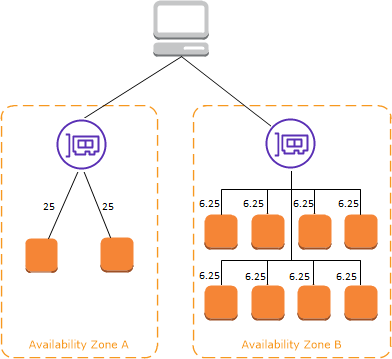
In this case, you need extra attention to make sure all your AZs have the same number of instances, something AWS Auto Scaling helps with a lot.
One of the challenges of implementing AZI is: how does your instance know which zone it is operating in? And how does it know how to invoke an endpoint that is in the same zone where it is operating? Again, it depends on the service, but two approaches that work broadly are:
- Use Availability Zone ID so your application can identify which zone it is operating in.
- Create AZ-specific DNS endpoints.
Use Availability Zone ID (AZ ID) so your application can identify which zone it is operating in
The AZ ID is a unique and consistent identifier of an Availability Zone across AWS accounts, and it is not necessarily the us-east-1 style identifier you see in the console. According to the documentation, AWS randomly maps physical Availability Zones to Availability Zone names for each AWS account. This approach helps distribute resources across Availability Zones in a Region instead of resources probably being concentrated in Availability Zone “a” of each Region. As a result, Availability Zone us-east-1a in account A may not represent the same physical location as us-east-1a in a different AWS account. The image below illustrates this a little:
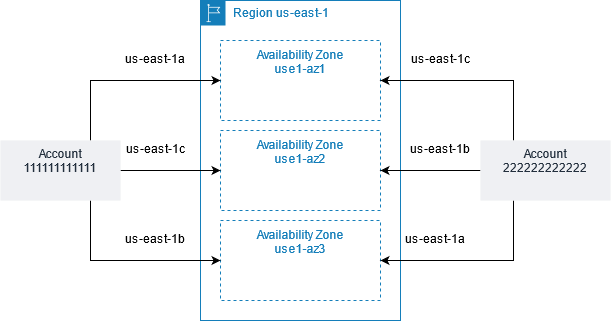
Because of this behavior, the best way for an instance of your application to know which zone it is operating in is to use the AZ ID through the EC2 Instance Metadata Service (IMDS). IMDS is an interface that allows Amazon EC2 instances to retrieve metadata about themselves. This information includes details such as instance ID, instance type, the AMI used, and the Region or Availability Zone where the instance is operating. IMDS is accessible only from the instance itself, using a special endpoint available on the instance’s local network.
To access IMDS, you can make an HTTP request to the endpoint http://169.254.169.254/. To get the Availability Zone (AZ) ID where the instance is operating, you can make a specific request to the following endpoint:
curl http://169.254.169.254/latest/meta-data/placement/availability-zoneThis command returns the AZ ID, which will be something like us-east-1a, us-west-2b, and so on. This approach works for EC2, ECS, EKS, Elastic Beanstalk, EMR, and other services I may have forgotten. I just wanted to emphasize how broad this approach is.
Create AZ-specific DNS endpoints
The service you are invoking will not always be behind a load balancer. One example is Amazon RDS itself, where you have a primary instance, standby instance, and read replicas.
With Amazon RDS, you can create AZ-specific DNS endpoints to access read replicas in different availability zones. This allows your application to read data from replicas located in the same AZ, improving performance and offering resilience.
Suppose you have an RDS database with replicas in us-east-1a, us-east-1b, and us-east-1c. You can configure DNS endpoints such as:
- db-read-us-east-1a.example.com
- db-read-us-east-1b.example.com
- db-read-us-east-1c.example.com
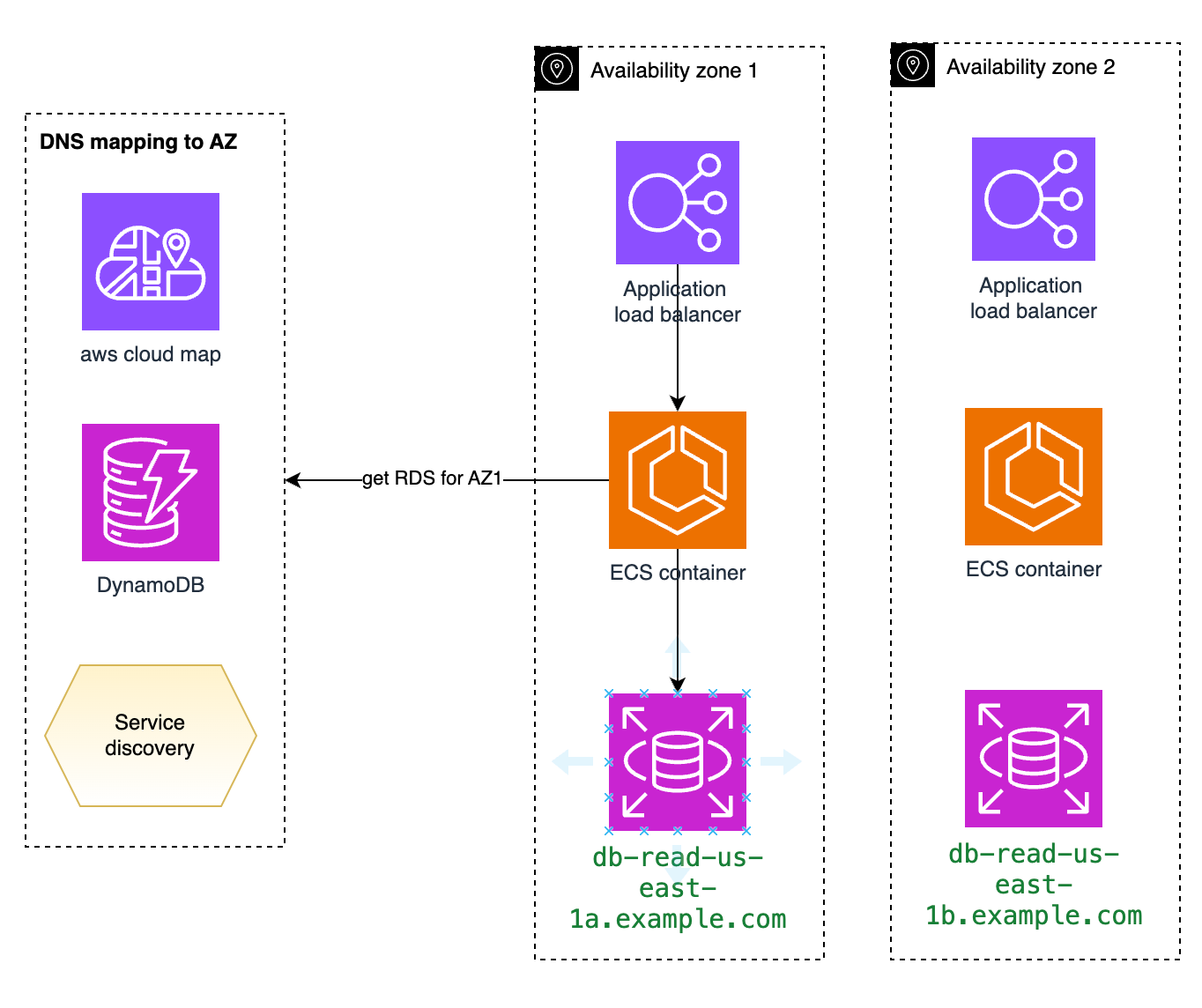
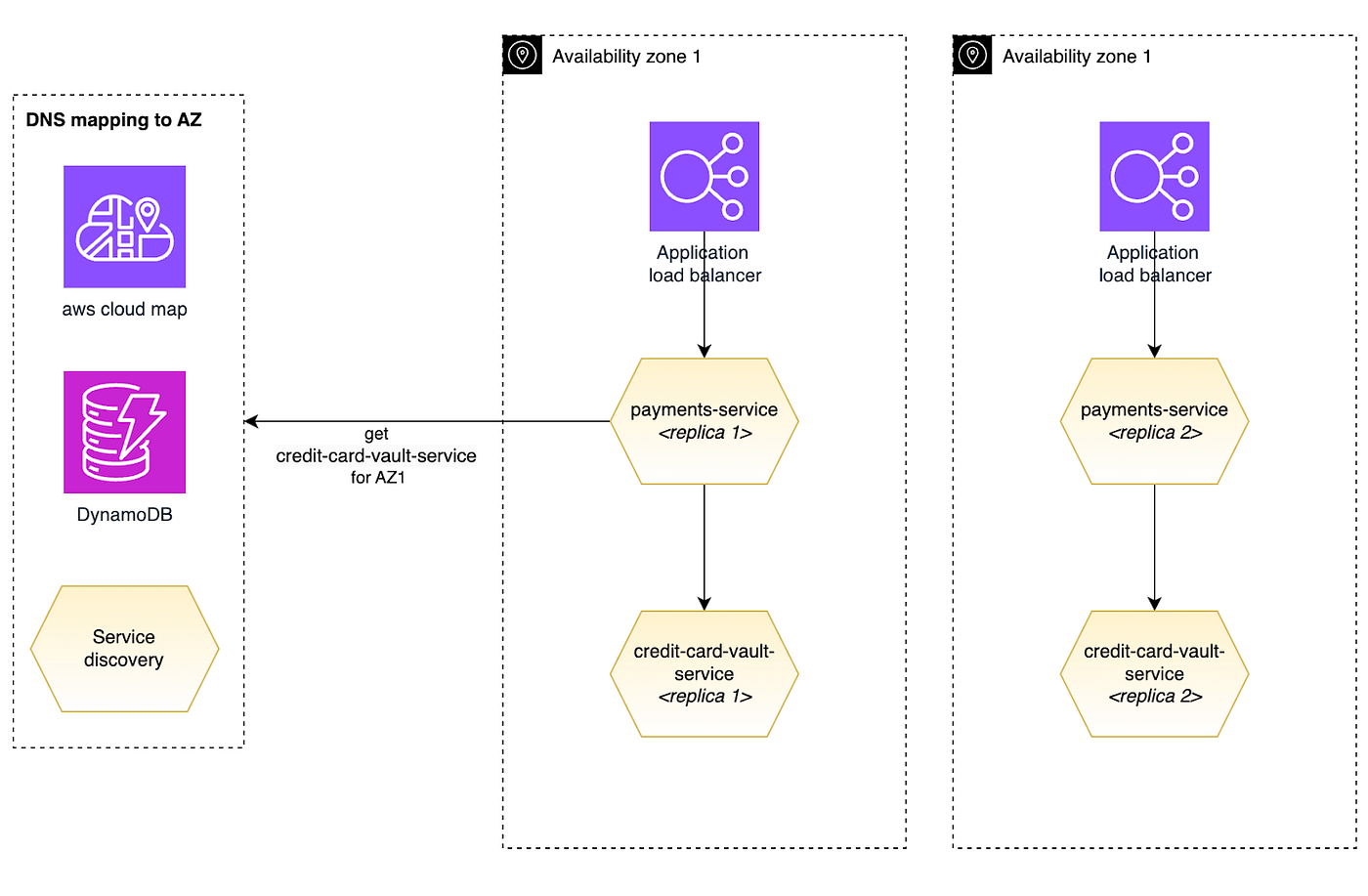
The same principles apply to services your application owns that run in multiple zones and where you want to prioritize invoking the service inside the same zone. This discovery process can be done through AWS Cloud Map, DynamoDB, or any service discovery system such as Consul, for example. Again, this will vary from service to service.
Deploying the application to be AZI
The way your application is deployed directly influences the implementation of AZI, because what we want is for failures in one AZ to remain contained in that AZ. What happens if, during the deployment of V2 of service A, you deploy to 2 AZs at the same time and that version has a bug? You create a major impact-scope problem for your application and customer experience.
There is a lot of content on the internet about deployment best practices, and it generally follows the logic below, where you have multiple environments and a version progresses through each environment until it reaches production. Ideally you do not put 100% of your traffic on it at once, but do it gradually, preferably in waves and with some time between them, to observe whether any error or alarm triggers. If it does, you roll back the version, preferably automatically.
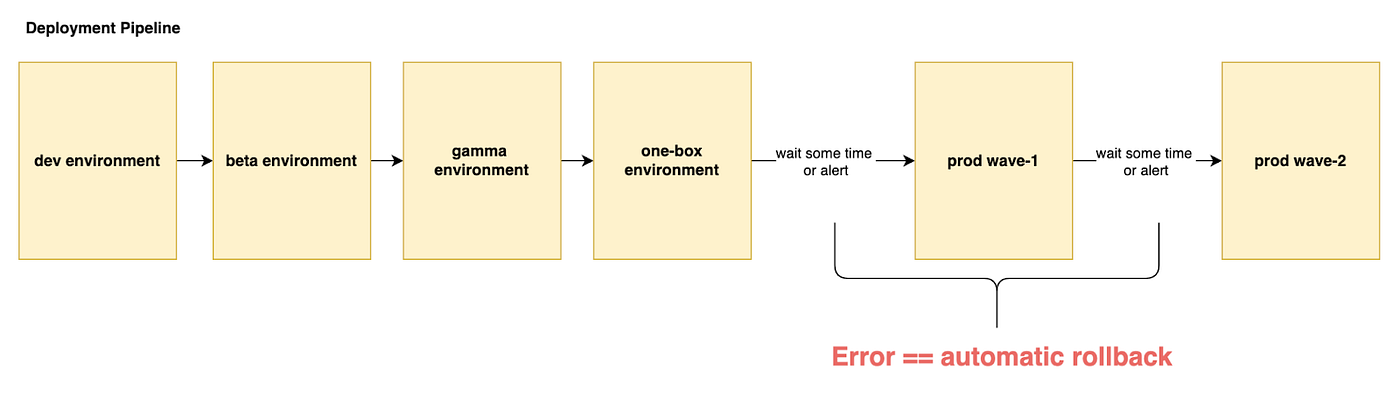
If the names above look a little strange to you, I suggest reading this excellent article from the Amazon Builders’ Library: Automating safe, hands-off deployments.
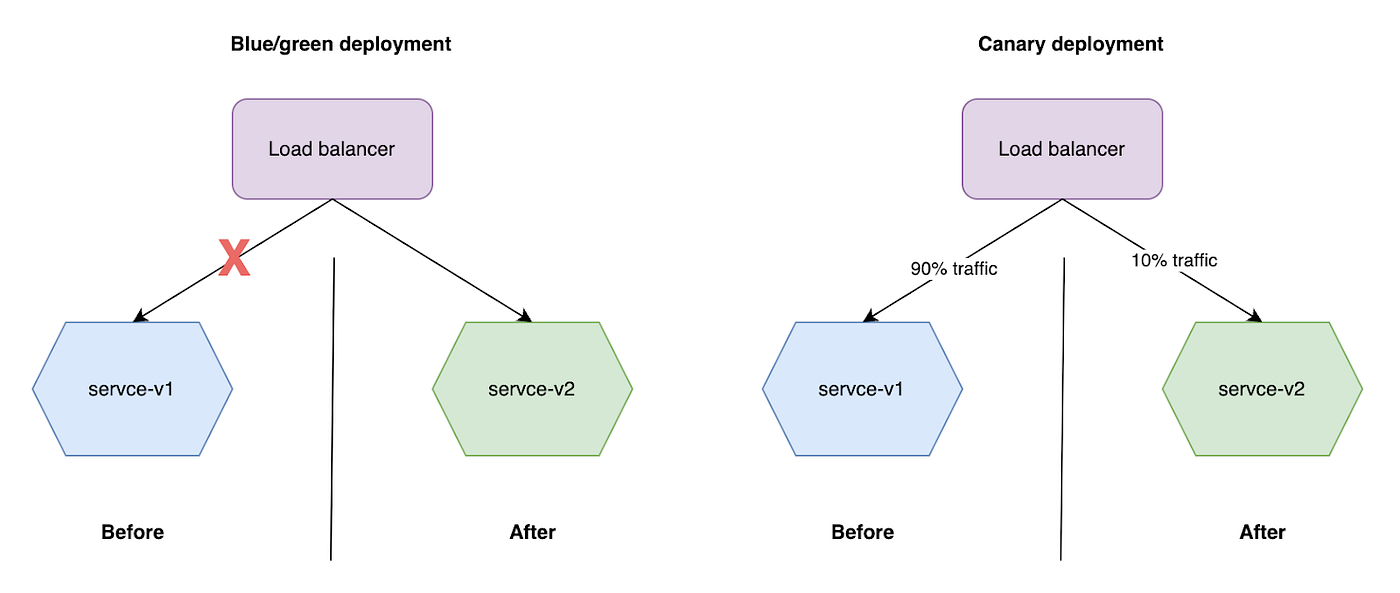
If we go a little deeper into each deployment event, it is also common to see approaches such as blue/green deployment, where you have two equal environments or copies, blue and green, and one is always active, initially blue for example, receiving traffic from your customers. When you need to start a new version, you deploy it to the environment that is not being used, in this case green. Another well-known approach is canary deployment, where you also have two environments, but each new version is made available in a parallel environment and you gradually shift your customers’ traffic. You can choose to move 10% of your traffic to the new version, then 50%, and then 100%.
Since we are talking about AZI in this post, we need to represent AZs in these diagrams. This is something I rarely see when deployment strategies are being defined, because the behavior in the image below can happen, where several AZs are impacted at the same time regardless of the selected approach.
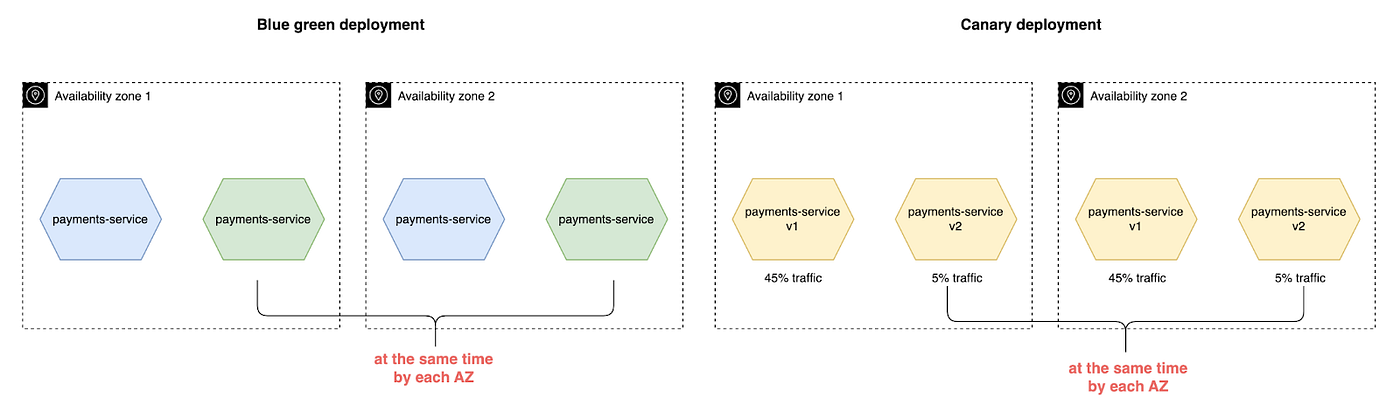
The key point here is that regardless of how you progress a version between environments, or how gradual this traffic shift is, you should also include in the equation doing one AZ at a time. This dynamic gives you the ability to evacuate traffic from an AZ in the case of a deployment that has a failure. Even if your pipeline implements automatic rollback on failure, having the ability to evacuate traffic is a faster strategy and therefore generates less impact.
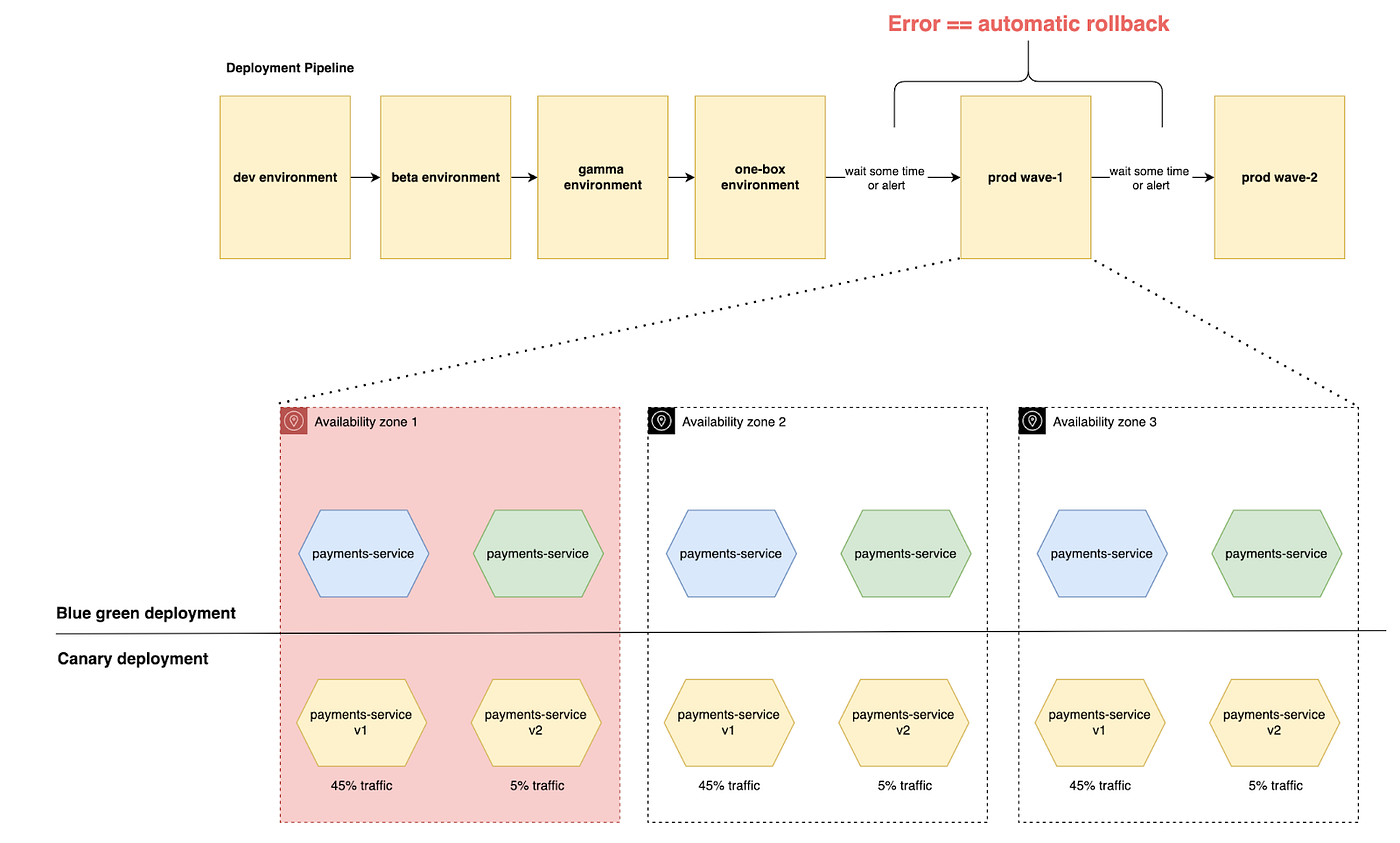
Doing this is not trivial and will vary according to the services that compose your application, whether EC2, ECS, Kubernetes, or others.
Making application observability AZI-aware
There is no point in designing and deploying the application for AZI if, when a failure happens in an AZ, we are not able to identify it. Observability is a critical factor. Basically, when we implement AZI, everything needs to be “AZ aware”, as we usually say. That means every signal and data point your application produces, such as logs, metrics, and traces, needs to contain the AZ ID. We already mentioned in this post how you can get the AZ ID inside your application.
After your application is instrumented to generate signals per AZ, we can build alarms per AZ, and this is where the magic of observability for AZI happens. Each metric of your application needs to be broken down by AZ and have a corresponding alarm. Amazon CloudWatch has a very useful feature called Composite Alarm, where you can combine alarms with AND and OR expressions.
With this CloudWatch feature, you could have, for example, a latency alarm per AZ and an availability alarm, and combine them to get a complete AZ view by service and by the dimension you want.
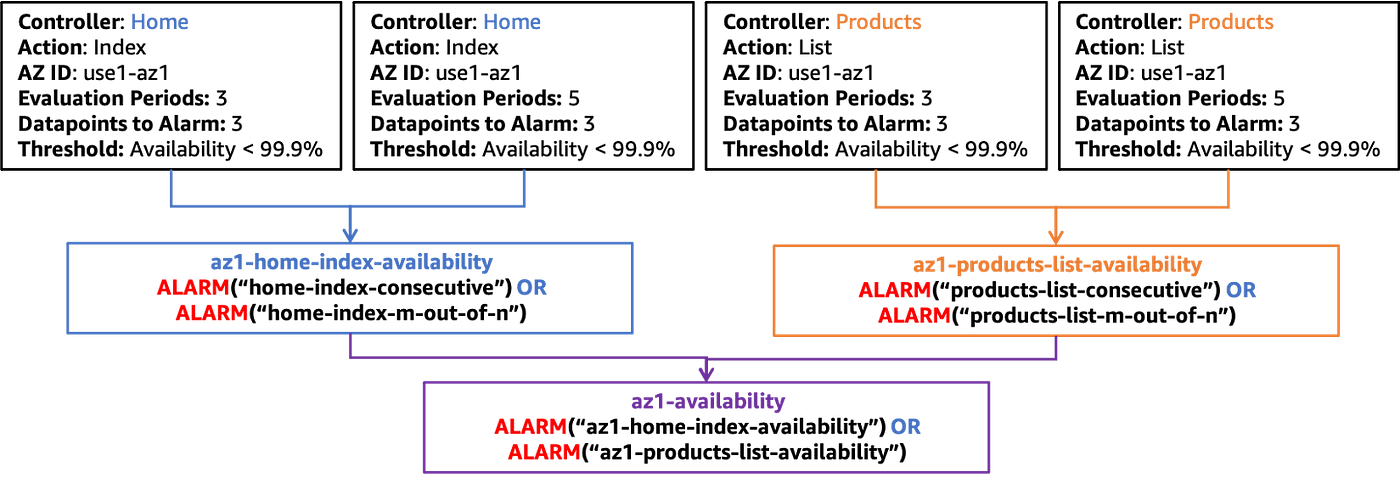
The same process shown above can be done for latency, giving you a view of all metrics from your services by AZ. So, in the event of an AZ failure from AWS or even a faulty deployment, you are now able to observe errors that may happen in your application within the context of each AZ and choose which action to take: rollback, evacuate traffic from an AZ, or both.
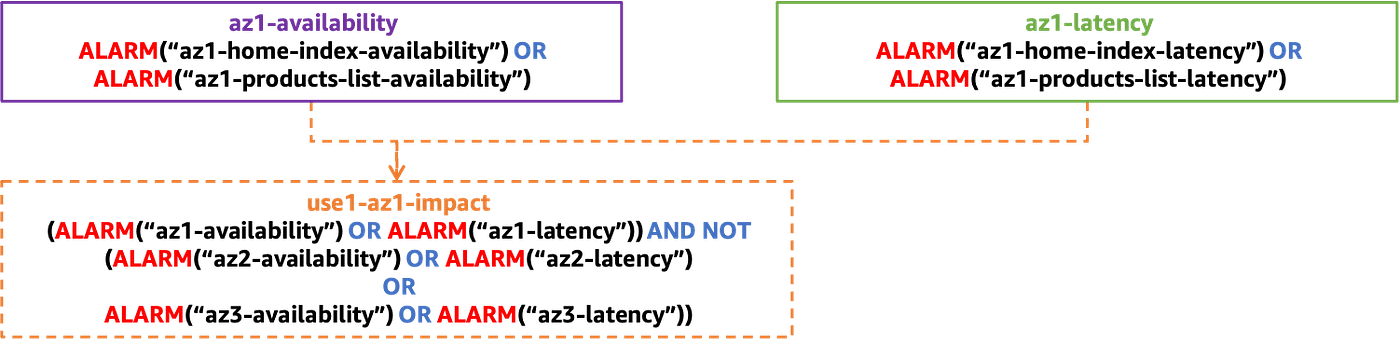
I gave examples here with CloudWatch, but the main point is to make everything related to observability per AZ, regardless of the stack you are using. I wrote only a little about observability here because there is an excellent AWS whitepaper about Advanced Multi-AZ resilience patterns that covers this topic in depth and includes very good examples.
Responding to Availability Zone failures
We have reached the final part of the post. You already know what AZI is, and you know some important things to consider when designing, deploying, and observing your application. Failures that happen in one AZ now remain contained in that AZ without impacting the other AZs. But the fact is that failure is still a bad experience, even when minimized. How can we respond to this failure as quickly as possible so we do not degrade the experience of application customers?
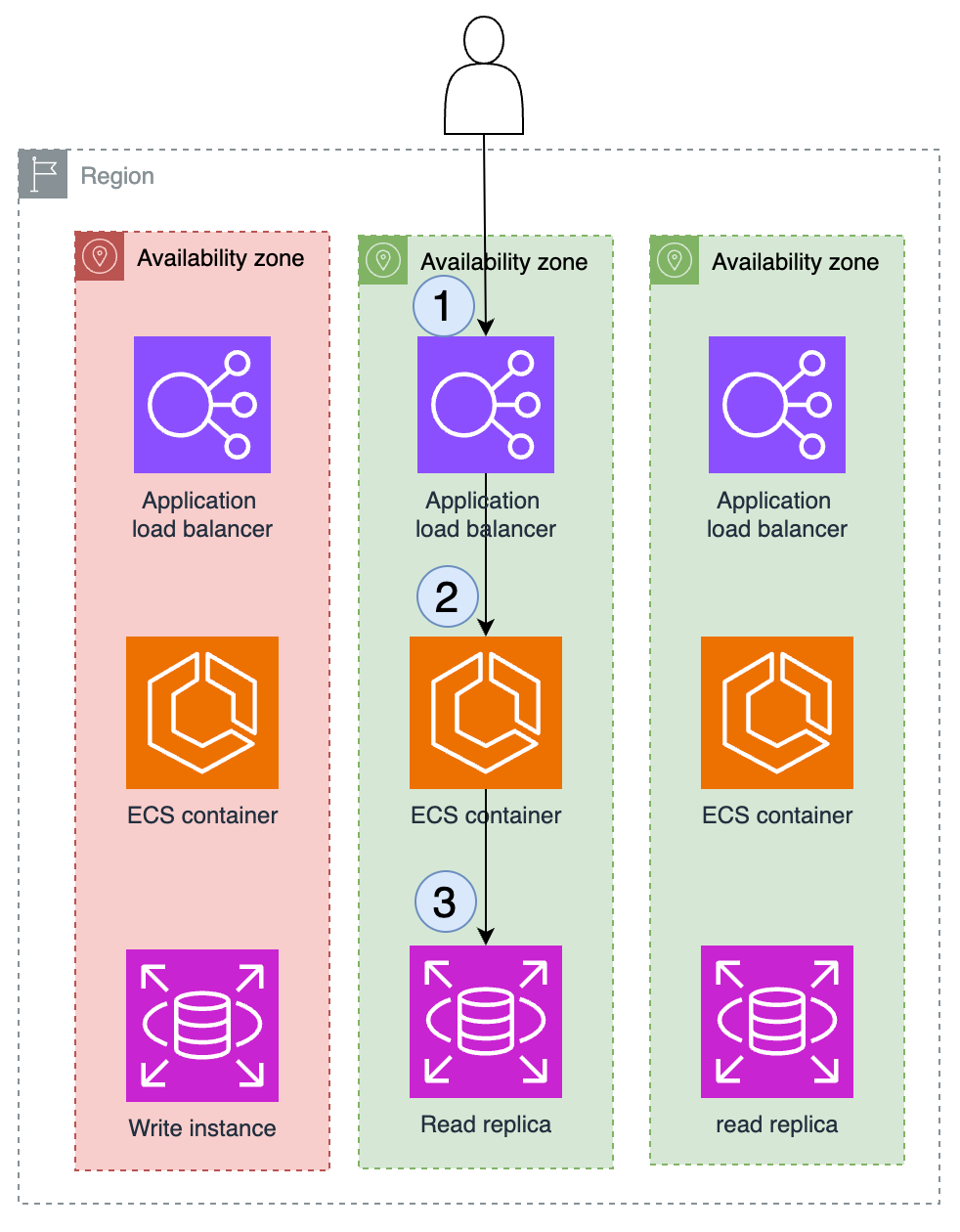
The short answer is evacuate traffic from the failing AZ, whether the cause is an AWS service or one of your application’s services. This traffic evacuation can be done through the control plane or the data plane. The recommended approach is to do it through the data plane, since the data plane tends to fail less than the control plane. It may happen that your application starts failing in one AZ and the AWS control plane is also unavailable. In that case, you would be unable to recover from the failure.
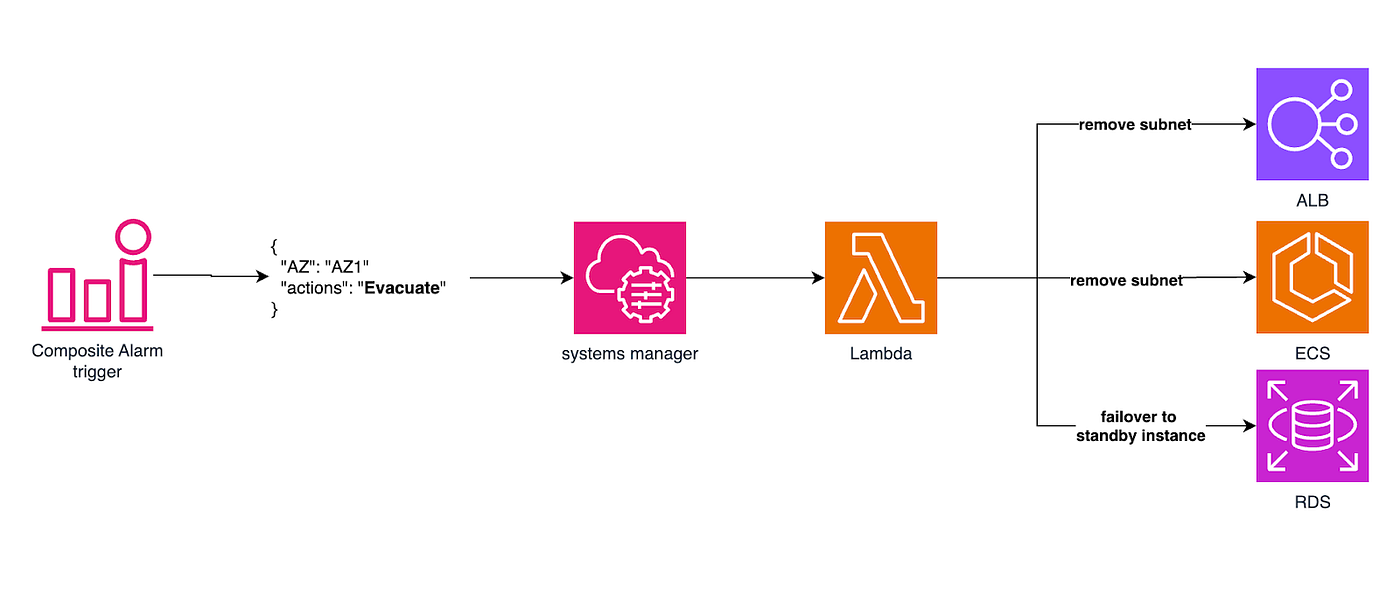
Evacuation through the control plane would look like this:
- An AZ failure is identified through an alarm.
- In the ALB configuration, the subnet from the problematic AZ is removed.
- In the ECS configuration, the subnet from the problematic AZ is removed.
- The RDS failover is performed to the standby instance.
All actions above use control plane actions and can be automated to respond to an alarm, with a flow more or less like this:
Once the alarms return to normal state, the same process can be triggered to reverse the AZ evacuation:
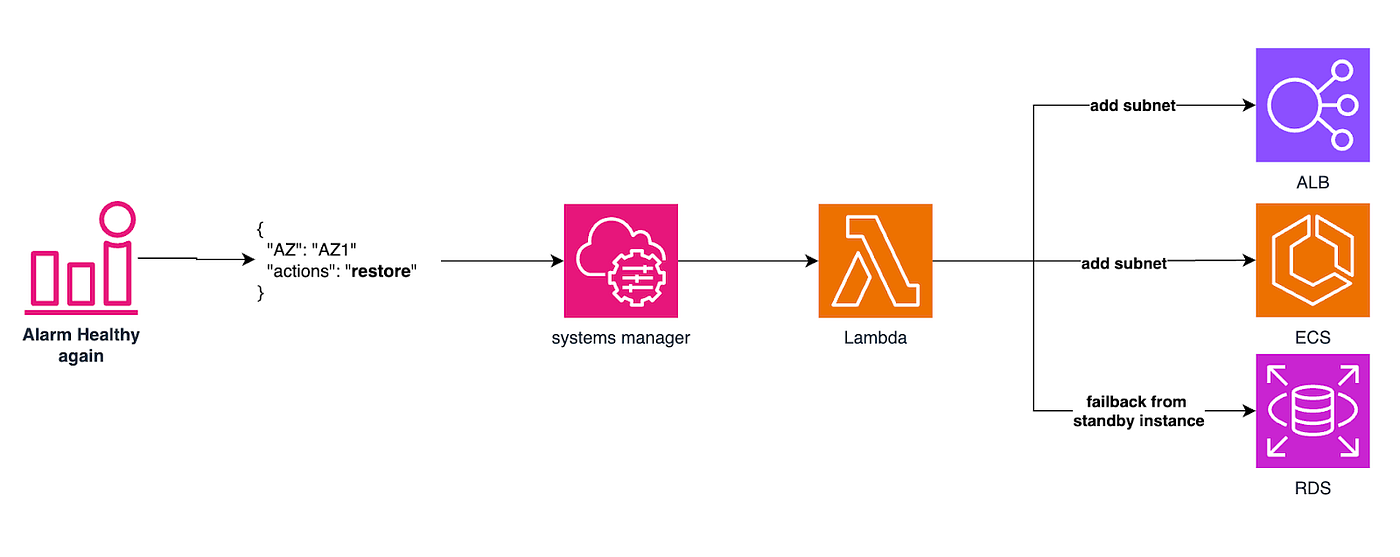
This process can be triggered automatically or manually by an operator. In this way, for our example architecture of course, traffic from an AZ can be evacuated using AWS control plane APIs.
A more robust approach would use only data plane APIs and resources to perform zone evacuation and restoration. This approach makes heavy use of the Route 53 Health Checks feature. Taking the documentation as reference, Amazon Route 53 health checks monitor the health and performance of applications. Each health check you create can monitor one of the following:
- The health of a specified resource, such as a web server or an API.
- The status of other health checks.
- The status of an Amazon CloudWatch alarm.
Basically, health checks are requests made periodically by Route 53 to evaluate the health of your service. If it fails within an interval a certain number of times, the service is classified as unhealthy, and in this case Route 53 stops resolving DNS to that destination. The good side of this behavior is that it uses 100% data plane APIs, and the Route 53 data plane itself has a 100% SLA. Now that health checks are understood, there are a few possible approaches we can look at.
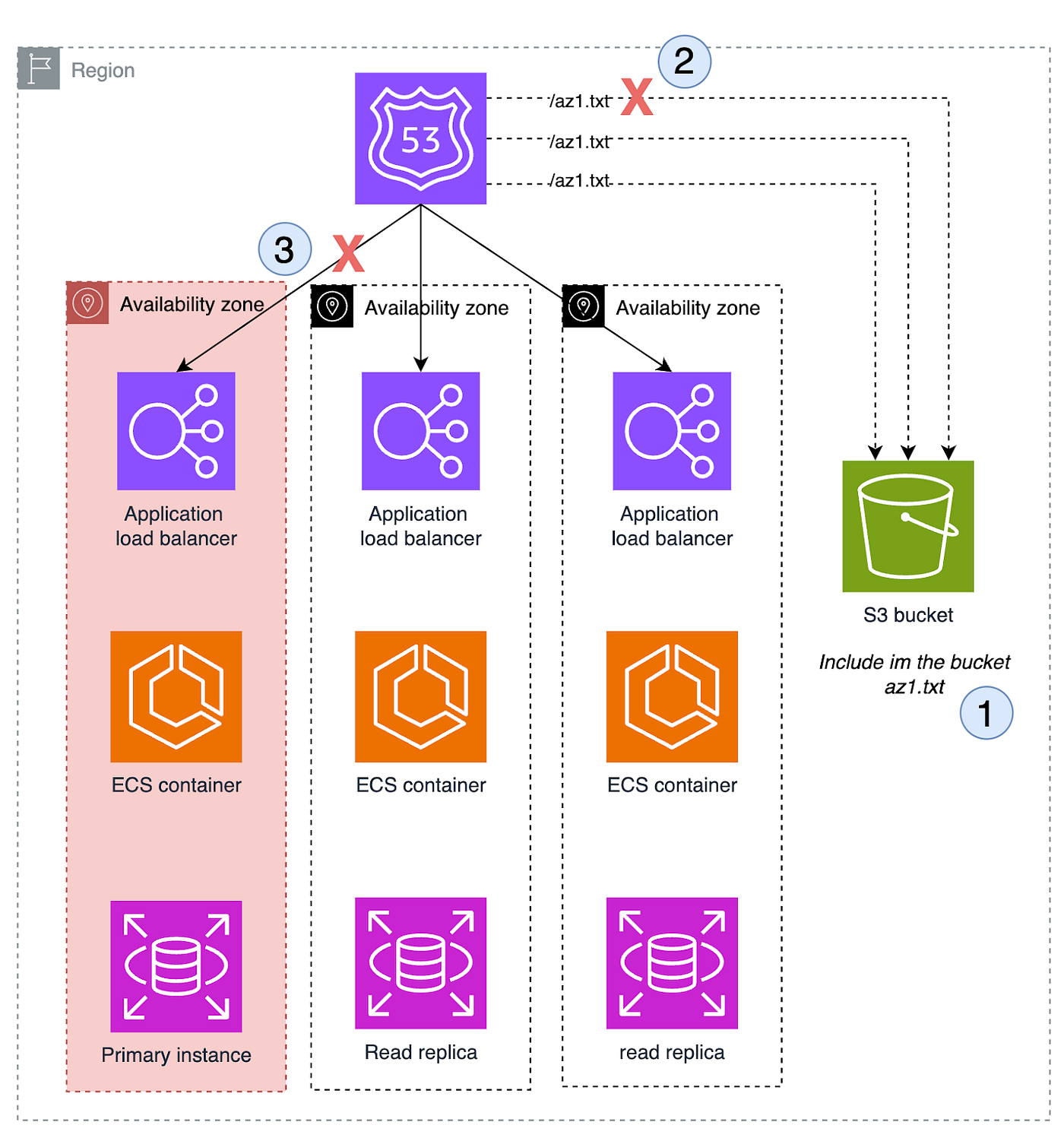
In the image above, we have the same scenario from this post, but configured with 3 health checks, one for each AZ endpoint, a practice already recommended earlier. The difference here is that we point the destination of these health checks to an S3 bucket and to the name of a file that corresponds to our AZ. So if one of these requests fails, our health check can fail and evacuate the AZ in question. Step 1 could be triggered by an alarm or a routine similar to the one we explained in the control plane approach. What is worth paying attention to here is the method of inserting a file into the bucket and making the health check fail based on the presence of that file.
This happens because Route 53 has a feature called inverted health check, where you can say that if the health check request returns successfully, it should fail, meaning the result is the inverse of normal.
Another way to achieve the same result is to store information about AZs and their state in a database and expose it through an API as the destination for Route 53 Health Checks, as shown in the simplified drawing below:
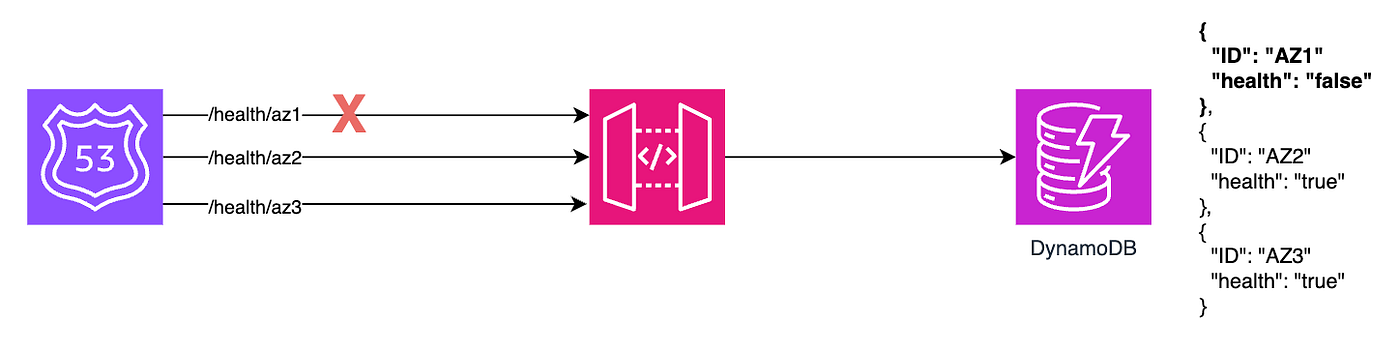
Now, if you change the record in DynamoDB, you can make the AZ healthy or unhealthy and evacuate or recover the AZ in question. You can also develop a service that evaluates as many checks as you consider necessary to determine that an AZ is unavailable and then evacuate traffic.
Lastly, I want to talk about a more managed approach to evacuating traffic from an AZ, using the Route 53 Application Recovery Controller service feature called zonal shift. From the AWS documentation, Amazon Route 53 Application Recovery Controller (Route 53 ARC) helps you prepare and complete faster recovery for applications running on AWS. Route 53 ARC provides two feature sets: multiple Availability Zone (AZ) recovery, which includes zonal shift and zonal autoshift, and multi-Region recovery, which includes routing control and readiness check.
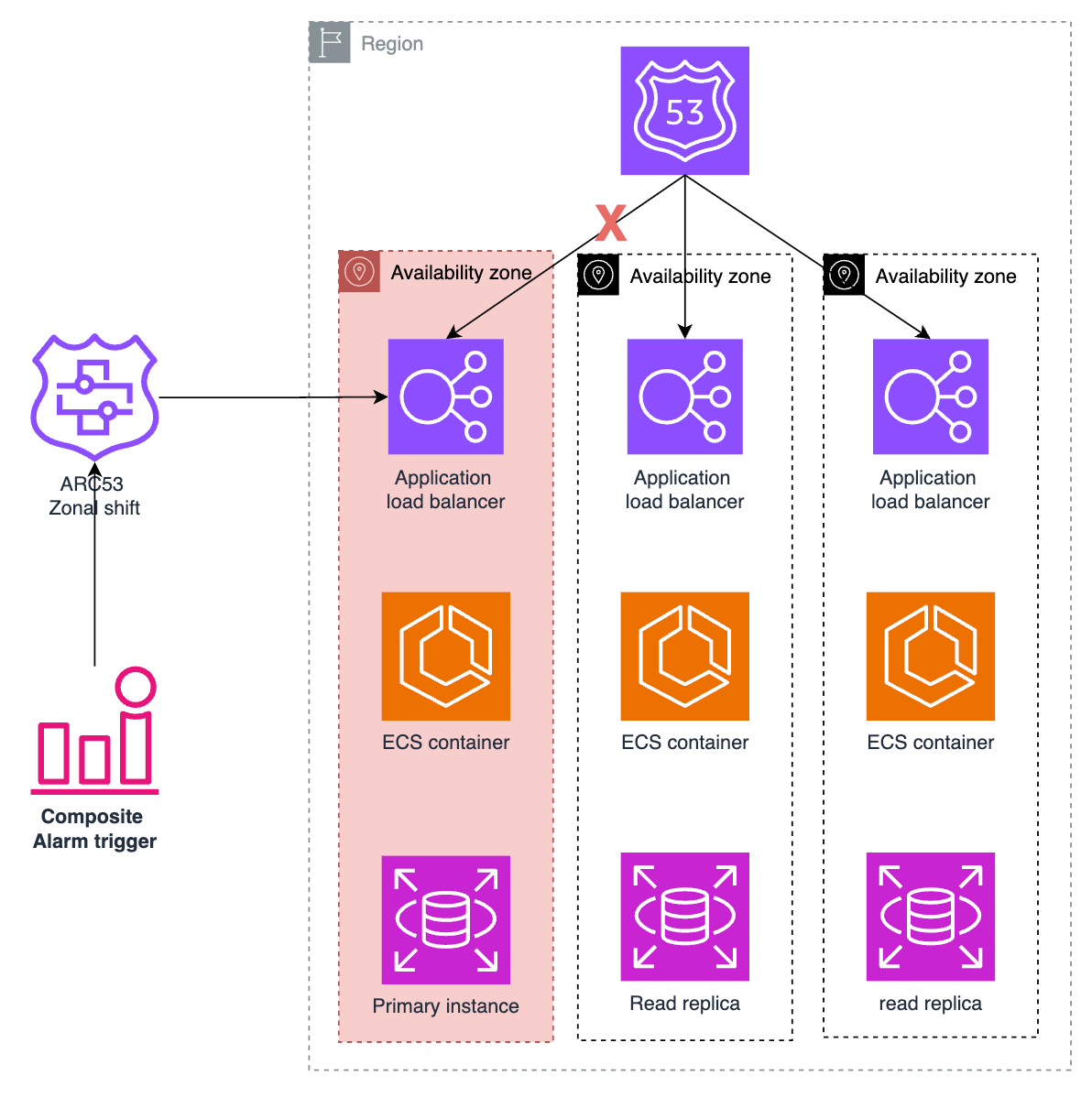
There are two possibilities here: Zonal Shift and Zonal Autoshift. Zonal Shift operates at the load balancer level of your application, whether ALB or NLB. What it does is make the ALB health check unhealthy, so Route 53 stops sending traffic to it. Zonal Shift is a manual feature, executed through Route 53 ARC data plane APIs, but it can be automated with the same approach we built above. We also have Zonal Autoshift, where you can configure an alarm that then triggers Zonal Shift, meaning traffic evacuation from the AZ in question.
Conclusion
Availability Zone Independence (AZI) is a fundamental practice to increase the resilience of applications that operate in the cloud. By adopting the AZI concept, applications are designed to isolate failures in a specific Availability Zone (AZ), preventing problems in one AZ from affecting operation in other zones. This results in a more robust architecture that is better prepared to handle failures without compromising customer experience.
Key points to implement AZI:
- Understand the scope of the services you use, whether zonal or regional.
- Reduce cross-AZ traffic as much as possible.
- Create AZ-specific endpoints.
- Instrument your application to produce logs, metrics, and traces by AZ.
- Design your deployment pipeline to act on one AZ at a time.
- Create dashboards and alarms for each metric by AZ.
- Create mechanisms to evacuate traffic from an AZ using control plane and, preferably, data plane APIs from the services.
The goal of this post was to focus on the fundamentals of AZI and approaches that can help in every stage, with a higher-level view between problem and solution. I intend to write a more hands-on post focused mainly on how to do AZI with Kubernetes (EKS), which is a stack I see causing a lot of confusion when implementing AZI because it is very flexible.
References
- https://aws.amazon.com/blogs/containers/choosing-container-logging-options-to-avoid-backpressure/
- https://docs.aws.amazon.com/whitepapers/latest/advanced-multi-az-resilience-patterns/availability-zone-independence.html
- https://docs.aws.amazon.com/whitepapers/latest/advanced-multi-az-resilience-patterns/appendix-a-getting-the-availability-zone-id.html
- https://docs.aws.amazon.com/vpc/latest/privatelink/create-interface-endpoint.html#access-service-though-endpoint
- https://docs.aws.amazon.com/whitepapers/latest/introduction-devops-aws/deployment-strategies.html
- https://docs.aws.amazon.com/AmazonCloudWatch/latest/monitoring/Create_Composite_Alarm.html
- https://docs.aws.amazon.com/whitepapers/latest/aws-fault-isolation-boundaries/control-planes-and-data-planes.html
- https://docs.aws.amazon.com/Route53/latest/DeveloperGuide/dns-failover.html
- https://docs.aws.amazon.com/r53recovery/latest/dg/what-is-route53-recovery.html
- https://docs.aws.amazon.com/r53recovery/latest/dg/arc-zonal-shift.html