Read the Portuguese version here: Você ou o seu time não vão aprender ReactJs em 7 dias ou em um Hello World!.

The goal of this article is to position the reader around the fact that building a ReactJs application to run in production in a stable and evolving way may not be as simple as some articles can make it seem.
With all the current popularity of ReactJs, Vue.js and Angular, there is also a flood of information, articles and video lessons simplifying, in my opinion, the learning curve. This article is based on my own experience learning ReactJs. I started using it in September 2017, right during the transition from React 15.6 to 16.0, including the controversy around the license change from MIT to BSD, which later, after some noise, went back to MIT.
Why did I start using ReactJs?
While looking for software to manage Lean with OKR and Kanban in 2017, I could not find any solution that solved the problem we had at the company, so I decided to create one. I concluded that the best approach would be to create a PWA, and I wanted to build both the backend and the frontend with JavaScript.
Then I faced the doubt I believe everyone still has: ReactJs, Vue.js or Angular? I already knew Angular 1.6 and 2.0. Vue.js and ReactJS I had never tested, not even for fun. I found Angular 2.0 complex in architecture and weak in official documentation, and there was also some tension about whether Google would continue with it or not, given the huge breaking change from 1.6 to 2.0. That made me insecure. So I started comparing Vue.js and ReactJs.
I ended up choosing ReactJs for two main reasons: community and architecture.
Community
I hope not to offend the Vue.js community, which is as large as ReactJs, but in my opinion it was less active in contributing code to the repository. Looking at both projects on GitHub, these were my perceptions in 2017, and they still were when I wrote the article:
-
Both projects had more than 120 thousand stars. Vue.js even had more than ReactJs at that point, though it did not in 2017, but I see stars mostly as admirers of the project. They may consume it, but they do not necessarily contribute.
-
ReactJs had almost 5 times more contributors than Vue.js. I believe this makes a difference in the longevity of the platform, more than the number of stars.
-
Of course, contributors do not necessarily mean meaningful activity, but if we look at each project insights and compare Pulse, Contributors, Commits and Code Frequency, the ReactJs numbers were higher. So I understood that there were in fact more people improving and maintaining ReactJs than Vue.js.
-
Given the size of Facebook, which created and was the main maintainer of ReactJs, I saw more long-term stability. ReactJs is widely used inside Facebook, so they have a lot to lose if the library ceases to exist. Not that this cannot happen, obviously, but that is how I thought about it.
-
If you search on Google Trends, ReactJs also appears with more emphasis.
-
I also like looking at the Stack Overflow Survey.
Architecture
I basically found JSX, the Virtual DOM and the freedom of developing with ReactJs very interesting. I know that freedom has a cost, and I explain it later.
I believe that any problem solved with ReactJs can also be solved with the same efficiency using Vue.js or Angular. It only depends on developers mastering the tool and the problem they need to solve. That said, there is also an emotional side to my choice: despite all the points above, I also simply liked coding with ReactJs more.
Even so, I recommend always paying attention to improvements in Vue.js and Angular, because there is a lot to learn from them.
Do you really need ReactJS? What problem does it solve?
As ReactJs itself says on GitHub and on the official website, it is:
A declarative, efficient, and flexible JavaScript library for building user interfaces.
And nothing more. Yes, nothing more.
If you have a problem that can benefit from SPA usage and component-oriented development, and if that application will grow and become more complex in the future, ReactJs is a good candidate for generating and orchestrating those components, in my view.
In other words, ReactJs is for creating visual interfaces. You will not build a complete application with it alone.
This is where my dissatisfaction begins with the large number of articles I see with titles like: Learn ReactJs in 7 days, in 5 minutes, or articles saying learning ReactJs has never been so easy. After 14 months developing with ReactJs, these articles seemed to underestimate the learning curve required to put a decent application in production with an acceptable level of quality.
If your problem can be solved by Hello Worlds or quick tutorials, maybe you do not need ReactJs. A simpler solution may solve it initially.
I went through the Hello Worlds, the 5 minutes and the 7 days. After that, I still felt I was at square one. So I keep thinking: is it just me? Or is it really not that simple?
I had been working with software development for 10 years. Whenever I build an application, questions arise around what, how and why I am implementing something. I think about how to better reuse code, about tests, code architecture, development patterns, how to solve the present problem while keeping options open for evolution.
For all these questions, I had difficulty finding documentation or help, and I believe other people may have the same issue. Difficulty may not be the right word, but doubts such as: Am I doing this right? Did I miss something?
Learning curve
Below I list the concepts I consider important when learning ReactJS. All of them were turning points for me. After I understood them, everything made more sense and my code improved.
Modern JavaScript: ES6, ES7, ES8, ES9 and so on
You can develop with ReactJs using ES5, but I do not know why someone would do that today. Knowledge of the latest JS implementations is very important. Imagine seeing the code below when it is not part of your daily work:
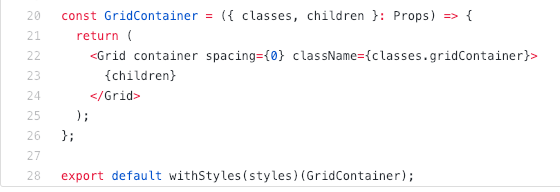
Is this JavaScript syntax? Is it ReactJs? Is it wrong? What is this thing?
Based on these questions, it is important to know modern JavaScript. It will be everywhere in ReactJs, in tutorials and in documentation. They already assume you know it. At minimum, I believe you should know what belongs to the language and what belongs to the library you are using.
JSX: syntax extension to JavaScript
In short, JSX is a syntax introduced in ReactJs to represent how a component should look when rendered.
See the code below:
function todoList(){
    return <div>Task 1</div>
}
This code will render, with more code involved in the process obviously, a div with the text “Task 1” in the browser.
JSX has been criticized a lot because it looks like it mixes HTML with JavaScript. But when you go deeper, you understand the benefit and why it is used. Here is the official documentation.
Virtual DOM
The Virtual DOM is an in-memory representation of the DOM maintained by ReactJs. When there is a change in the DOM, ReactJs uses a process called Reconciliation to identify what changed and render incrementally, reducing browser rendering costs. A complete explanation can be seen in the official documentation and in this video.
If you intend to go deeper in understanding ReactJs, I really advise you to download the source code and understand what it is doing. There are sophisticated algorithms and concepts that make ReactJs what it is.
Component lifecycle
This is a subject I always discuss with the team: if you are using any library or framework, understand its lifecycle. There is always one.
Understanding the lifecycle of a ReactJs component allows you to create more optimized code and, at minimum, prevents unnecessary renders, significantly improving performance.
Functional programming
At first I had some difficulty with functional programming concepts, so I had to study them more deeply. You do not need to go deep into functional programming to learn ReactJs, but to develop in a more elegant way and simplify your code, I believe you should at least be aware of concepts such as pure functions and the basic functions for handling arrays, such as map, reduce and filter. Understanding higher-order functions and immutability is also important.
State management
For me, the concept that added the most to me as a programmer when learning ReactJs was definitely application state management. State is a broad term when we talk about web applications. ReactJs applications have components with local state. In a simplistic way, state is basically an atomic object or an aggregate of objects with all the information that needs to live and be modified in the browser.
Imagine a JSON object representing the entire visual state of your application. For example, if there is a modal, it may be displayed or not. That would be the state of a component or of the application. As I said, state management is a broad term.
There are state management libraries almost as famous as ReactJs, such as Redux and MobX, which can even be used without ReactJs. These libraries help us turn local state into global state. This is a poor explanation, but the key point is: study state management.
At that moment, I saw Facebook’s new proposal for managing state and component lifecycles with Hooks as a turning point.
SPA: Single Page Application
At this point you probably know what an SPA is, but it is worth highlighting that ReactJs is aimed at SPA development. So you should be aware of that when developing. Your application will, or at least should, load “everything” in a single page, or at least the critical part of your application. Everything else would be loaded asynchronously.
I leave the Wikipedia description here.
PWA: Progressive Web Apps
In my case, I wanted to build a PWA with ReactJs. Anyone who has developed a PWA that follows all principles knows it is not that easy either. With ReactJs plus PWA come questions such as: when should I initialize my Service Workers? How should I handle components to support offline-first? How should I style things to support Critical Render Path and Instant Loading?
- This article by Addy Osmani brings some ideas.
I also read this book:
Component-oriented development
ReactJs lets you split the UI into reusable pieces that can be combined to form more complex UIs. In other words, it allows you to create components and combine them to form other components.
What is a component? How large should a component be before I need to split it? Or how small should it be?
The official documentation has a basic explanation of the subject. The important part is learning how to think in components. And a reminder: Web Components are not ReactJs. That is another widely discussed topic and can cause confusion.
TDD: Test Driven Development
Today I am somewhat radical about this subject. I believe that in 2018 nobody should start new code or a new project without thinking about tests first. It is the best long-term investment in application quality. Doing TDD with ReactJs was very different from what I was used to.
Do I test only one component? Can I test end to end? Should I test state changes? How do I mock components, APIs and so on?
This subject was hard to find documentation or help for, so I kept jumping from tutorial to tutorial and reading some books. Among the main tools I use today are Jest, Enzyme, Chai and Mocha.
Server-side rendering
If you are developing an application where SEO is important, meaning the various pages of your application need to be indexed by search engines such as Google, you will need server-side rendering.
Because ReactJs is a JavaScript library running in the browser, only after all your code has been downloaded from the server, parsed and executed does your application really come to life and gain its appearance. From the perspective of the search crawler, depending on how you programmed it, your application may be just a blank page. For the search engine, that has zero relevance. You disappear from the map.
Imagine spending time developing a ReactJs application and, when it goes live, the company’s revenue drops because you lost all organic traffic from Google.
Server-side rendering is the process that allows you to generate components on the backend. It is like a typical HTML page being loaded: until all JavaScript is loaded, it remains without interactivity, but the content is already available and can be indexed by search engines.
For me, server-side rendering also improves perceived performance for the user.
Static Type Checker
This is already a slightly more advanced concept. JavaScript is a dynamic and weakly typed language. It also performs type coercion automatically.
Because of this, as the code grows, it can become hard to find performance bottlenecks or refactor. To help with that, Facebook created Flow. It allows you to define types for variables, objects, functions and custom types. Your code becomes more readable and less prone to bugs caused by type coercion.
An alternative to Flow is using TypeScript to develop ReactJs applications. I like TypeScript a lot and almost used it in the project. I only did not because I wanted to try something different with Flow and stay closer to the official ReactJs implementation.
Learn how to debug your application
Debugging ReactJs applications is a little annoying, but after you get used to the tools it becomes easy. I basically use React Developer Tools, Redux DevTools and the Visual Studio Code debugger with Chrome.
Learning to use these tools well will help a lot. And do not forget Chrome DevTools.
ReactJs ecosystem
Remember when I said ReactJS is only for creating visual interfaces? So what about everything else a robust application may need?
-
A way to route between pages.
-
A way to make HTTP requests.
-
A way to support other languages in the application.
ReactJs answers none of these questions. You have the freedom to do it however you want. That is where the problems start. You have to find another library that solves your problem or create one yourself.
The problem is that you may end up using a library that may not work in the future, since ReactJs evolves without worrying about these third parties.
Some of the most popular libraries that make up the ReactJs ecosystem are:
-
React Router, mainly for routing between components and pages.
-
Axios, for handling HTTP requests.
-
Apollo Client, useful if your backend is not a REST API or simple AJAX callbacks and you are already deeper into ReactJs and GraphQL.
-
React i18next, if you need to support other languages in your application.
I mentioned only a few examples, but the fact you should remember is that ReactJs will only generate your visual components. Everything else you need will require research, dependency maturity analysis and some risk taking.
Webpack
When developing a ReactJs application, you will probably use features that do not work in browsers without a transpilation process from the code you wrote to the code the browser understands. Examples include JSX and newer JavaScript features. Usually this is done by a task runner or bundler. Webpack is both.
Although it is a separate tool, I see it as a fundamental part of your development ecosystem. The official documentation is extensive.
Code development standards and style guides
Preferably before starting, define the coding standards you or your team will follow. If possible, bind those standards to requirements in a continuous integration pipeline, so code outside the standard cannot go to production.
I started with the AirBnB standards below:
After some time I centralized all this configuration through Prettier, which I found simpler.
These standards were configured in the IDE I used and also in TravisCI, Code Climate and Codacy, and were validated on every commit to the repository.
How do you architect all this together?
This was another major doubt for me. How do I organize my code and, more importantly, my components? Even if my application has hundreds or thousands of components in the future, how do I keep its complexity and modularity flexible?
ReactJs does not answer that either.
Facebook created a boilerplate tool to create a default application template: create-react-app. I did not use it because when I started the project it did not support server-side rendering. Another reason was that it felt too much like a black box to me; I wanted to truly understand how to assemble a ReactJs development environment.
Basically, create-react-app generates all files and directories for you to start developing your application, including configuration for running tests and linters.
For structuring a project, these were the important questions for me:
-
Understand stateful and stateless components.
-
Study the main design patterns used in ReactJs applications. At minimum, understand container components and presentational components.
-
Without proper handling, a ReactJs application is a single JavaScript file your page has to load. The larger your application gets, the larger this file becomes. Imagine your application two years from now with 5,000 components and 10 MB to load and execute. For this there are code splitting and lazy loading, which divide your code into smaller parts and load each part only when it is really needed. This is fundamental for keeping performance as your application grows.
I usually read a lot of programming books. The books below helped a lot when defining the application structure:
Here are three links I find useful when deciding how to structure projects:
How to Structure Your React Project
The 100% correct way to structure a React app (or why there is no such thing)
Note: do not get carried away by the idea of a “100% correct way”, but it is an excellent article.
How to better organize your React applications?
Pay attention to the community
Good software is updated software. The closer you are to the latest releases, the better I consider it. So pay attention to the improvements and breaking changes in the official repository.
You will have to use third-party libraries that are outside ReactJs but inside the ecosystem. Pay attention to those changes too, and whether they align with the official repository.
My main tip, regardless of your experience level, is to join the React Brasil Slack group. There were almost 5,000 people exchanging information all the time. You could stay connected all day and still not keep up. There were conversations for people who had never heard of ReactJs through expert, ninja, master level and so on.
Conclusion
The post became long and may have given the impression that I want to say developing with ReactJs is super complicated and that you should not do it. That is not the intention. The issue is that when we build a real application that needs to generate value for its users, the huge number of tutorials available does not help much. In fact, on the “how to do it” side, not even my post helps.
I only wanted to list some topics I realized I needed to learn when obstacles appeared in the project. You do not need to master all these topics, but I think you at least need to know they exist.
I have heard people saying that adding ReactJs to project X or Y was a mistake. But they underestimated the learning curve. They left something they knew very well and moved to a new concept thinking they would keep the same pace. Every change has a performance gap at the beginning. That is what I wanted to point out in this post.
I intend to write other articles showing everything from how I assembled the ReactJs development environment to the project architecture and some important refactoring points I went through.